Please explain performance tunes

Disclaimer: Links on this page pointing to Amazon, eBay and other sites may include affiliate code. If you click them and make a purchase, we may earn a small commission.

J persons

SHO Member
Joined
Apr 20, 2022
Messages
215
Reaction score
107
Location
Natchitoches, LA
Having built several old school performance engines, I am still a novice when it comes to EFI and tuning tweaks, and I have a few questions. 1, I've read that the tunes are emailed, how are they downloaded into the devise?
2, Gearhead sells at least two different devises for the SHO, which one do I need? I plan on buying the 3 bar MAF, plugs and thermostat.
3, Does the tuning device need to be plugged into the OBD port constantly for the tune to be work?
Thanks in advance, John
 

Joshw0000

SHO Member
Joined
Sep 20, 2018
Messages
777
Reaction score
595
Location
North Carolina
Having built several old school performance engines, I am still a novice when it comes to EFI and tuning tweaks, and I have a few questions. 1, I've read that the tunes are emailed, how are they downloaded into the devise?
2, Gearhead sells at least two different devises for the SHO, which one do I need? I plan on buying the 3 bar MAF, plugs and thermostat.
3, Does the tuning device need to be plugged into the OBD port constantly for the tune to be work?
Thanks in advance, John

Others will chime in with more detailed info, but see below for my responses.

1) Some tuners can download directly but usually you'll download the file to a computer and transfer it to the tuner via a connected cable.

2) All "tunes" are intended to modify the factory logic the ECU applies. Different companies use slightly different languages (i.e. SCT vs HP would be comparative to writing a Twitter app for Android vs Apple). The end result is the same if the tune is properly written and applied. But the way the developer/tuner creates the file will be slightly different.

3)No. Once the tune is applied it can be removed. Some tuners with displays can be plugged in all the time and be used as gauges, create log files (to send back to the person providing the tune so they can review and tweak the tune), record 0-60 times, clear fault codes, etc.

Some mods will require a tune. If you don't install the tune, the mod will have adverse effects rather than performance gains. I hope this helps.

Sent from my Pixel 7 Pro using Tapatalk
 

Cheesehead

SHO Member
Joined
Jan 26, 2020
Messages
126
Reaction score
64
Location
Schofield, WI
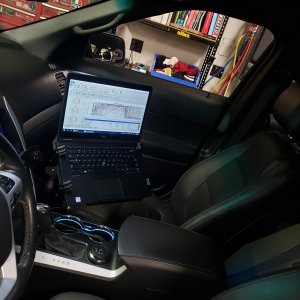
I was new to this as well when I got my SHO. You will need a tuner which is easy enough to use. The fun part is hooking up the tuner to a laptop and then data logging. Then you just send the file to someone like Gearhead for them to see what's up once their tune has been installed. That's the interesting part. Found a boost leak I didn't even know I had. As for what to get ask the dudes that run 12's and 11's lol
 

Ecoboost_xsport

SHO Member
Joined
Mar 21, 2020
Messages
2,039
Reaction score
3,944
Location
Sacramento, CA
1) You will buy a tuning device from some reputable tuner and they typically provide some level of support, whether it's a few revisions, lifetime, or somewhere in between. They are emailed to you. You then connect the device to your laptop/pc, move the file to the device, then connect your device via OBD port to the car. Load the tune and you're in business. Most good tuners will ask you to do a datalog using a configuration file they've provided (different tuners like seeing different parameters). They will ask you to perform certain driving conditions while logging, then email the file back to them so they can fine tune your file. Most mods will require a new to tune in order to maximize their capability...which means you usually develop a relationship with your tuner.

2) there are a few different tuner manufacturers out there and each has different "levels" of devices. The 2 big ones are SCT and HPTuner. SCT is the most popular for this platform and will provide you with the most flexible scenario. HPTuner is a bit more powerful of a tool, but the end result would be the same. Stay away from single-tuner devices like the crap from Livernois. You'll be stuck with them forever...no one else supports their device. Nice thing with SCT...you can jump between tuners and even have multiple tunes available from different tuners. IE, a full e85 race tune from AJP, a street e30 tune from GearHead, a towing tune from BrewCity Boost and a fuel economy tune from Unleashed as an example. Since they all use SCT, you can store each file on the device and switch on the fly (you have to load each one...not just toggle).

All tuners essentially reflash the factory PCM. Gone are the days of "chips". You can always go back to stock if needed.

As for the different devices within each manufacturer. Take SCT, for instance. The popular devices are the SCTx4 and the Livewire TS. Each one has basic functionality as a loader, meaning they both load tunes into the car (you can disconnect and stuff the device in your toolbox if you like). From what I've heard the Liverwire is a bit faster. The Livewire also offers a screen that can allow you to have gauges if you decide to dashmount it. You can also log with it. Most ppl prefer to datalog with the free SCT software via your laptop, though...it's just a bit easier to use.
 

76FoMoCo

SHO Member
Joined
Nov 22, 2018
Messages
1,796
Reaction score
1,930
Location
Nampa, ID
Live wire ts, plugs and a 3 bar with 93 tune is a great place to start.
 

76FoMoCo

SHO Member
Joined
Nov 22, 2018
Messages
1,796
Reaction score
1,930
Location
Nampa, ID
OK, I ordered a Livewire TS from Gearhead. Has a basic tune already been installed in the devise?
You need to plug in the device into the obd2 port and get the Strategy code. Then you need to send this to your tuner. They will send you a configuration file and a tune. Load tune to your car via the ts and do a log and send it back to the tuner. Lot's of new learning please feel free to ask.
 

J persons

SHO Member
Joined
Apr 20, 2022
Messages
215
Reaction score
107
Location
Natchitoches, LA
Looking over the OBDII cable for the livewire ts, there are multiple ports for cables, other than the OBD and the cable for the tuner. Are these used for anything or should they be ignored?
 

Ecoboost_xsport

SHO Member
Joined
Mar 21, 2020
Messages
2,039
Reaction score
3,944
Location
Sacramento, CA
Looking over the OBDII cable for the livewire ts, there are multiple ports for cables, other than the OBD and the cable for the tuner. Are these used for anything or should they be ignored?
The hdmi port is what the obd cable connects to...the only other port you need is the USB Micro port on the side, which connects to a laptop when you datalog with Livelink, which I highly recommend you get familiar with.
 

76FoMoCo

SHO Member
Joined
Nov 22, 2018
Messages
1,796
Reaction score
1,930
Location
Nampa, ID
This will give you a how to on data log. When you get to #7 stop and then you will load a config file you will receive with your tune file via Email. This will have your tuners preferred PID's of what they want to see for the log. you will see in the top center of the livelink load confing file. BTW you can not data log with the livewire in gauge mode it will not talk to your computer.
 

J persons

SHO Member
Joined
Apr 20, 2022
Messages
215
Reaction score
107
Location
Natchitoches, LA
Got the tune file and the other download from Gearhead, and ran into a problem. Down loaded the tune file and my computer is asking, "what app do you want to open this file with?" It doesn't give me any choices. I had previously downloaded the Livelink software.
 
Last edited:

76FoMoCo

SHO Member
Joined
Nov 22, 2018
Messages
1,796
Reaction score
1,930
Location
Nampa, ID
Got the tune file and the other download from Gearhead, and ran into a problem. Down loaded the tune file and my computer is asking, "what app do you want to open this file with?" It doesn't give me any choices. I had previously downloaded the Livelink software.
Can you just save it to your desktop? Most times you can move it from your email to desktop. Then open live link and move it to you device
 

J persons

SHO Member
Joined
Apr 20, 2022
Messages
215
Reaction score
107
Location
Natchitoches, LA
OK Got it saved to my desk top, and after several tries, and got it loaded into the live link sofware, but not into the devise. I have "honey-do's" all day tomorrow so it will be a couple of days before I can load it into the car. Thank you for the assistance.
 

J persons

SHO Member
Joined
Apr 20, 2022
Messages
215
Reaction score
107
Location
Natchitoches, LA
More questions about the livelink sofware:
Is it necessary to have the SCT device connected to both the car and to the computer at the same time? I currently only have a desk top and don't want to drag iit all out to the garage.
I loaded the tune from GH into the Liivelink, and got a screen that looks like sort of like a spread sheet, each line is named, but all the fields were zeros. The name of the tune is shown at the top of the form.
 

76FoMoCo

SHO Member
Joined
Nov 22, 2018
Messages
1,796
Reaction score
1,930
Location
Nampa, ID
More questions about the livelink sofware:
Is it necessary to have the SCT device connected to both the car and to the computer at the same time? I currently only have a desk top and don't want to drag iit all out to the garage.
I loaded the tune from GH into the Liivelink, and got a screen that looks like sort of like a spread sheet, each line is named, but all the fields were zeros. The name of the tune is shown at the top of the form.

Did you download Derive? this is what you need to communicate with the livewire. you can just have your device plugged into your desk top to upload the tune to it and the config file for logging. then plug it into the car and program the PCM. Make sure your battery is in good shape and turn off all wipers, radio, AC, ect. You can log off just the device and them plug it back into your laptop to download to live link but it will only hold one log at a time. the device will capture you factory tune and keep it in case you need to flash back and will be married to the car. you can put more than one tune in the device. above is a link to help you out.
 

Ecoboost_xsport

SHO Member
Joined
Mar 21, 2020
Messages
2,039
Reaction score
3,944
Location
Sacramento, CA
More questions about the livelink sofware:
Is it necessary to have the SCT device connected to both the car and to the computer at the same time? I currently only have a desk top and don't want to drag iit all out to the garage.
I loaded the tune from GH into the Liivelink, and got a screen that looks like sort of like a spread sheet, each line is named, but all the fields were zeros. The name of the tune is shown at the top of the form.
You will need the device and a laptop to datalog your vehicle....at least to do it the right way.

20210116 144431
 

kryptto

The Best Thing About Cars... ones in my mirror.
Supporting Member
Joined
Mar 24, 2023
Messages
3,196
Reaction score
2,066
Location
South East, Florida
I must be the only HP tuner owner around here LOL. HP OBD2 device can live log without a computer, stores to the device and then plugged into a laptop/computer to be read by the VCM Scanner/ VCM Editor. I originally picked HP - since my car has straight DP's and Gearhead and all others report on their sites they wont tune off-road and gave into buying HP.
 

SHOthyme

SHO Member
Joined
Mar 5, 2020
Messages
393
Reaction score
491
Location
MN
I must be the only HP tuner owner around here LOL. HP OBD2 device can live log without a computer, stores to the device and then plugged into a laptop/computer to be read by the VCM Scanner/ VCM Editor. I originally picked HP - since my car has straight DP's and Gearhead and all others report on their sites they wont tune off-road and gave into buying HP.
You can live log with the livewire and store it on the device too, you do NOT need a laptop, but there are people here that prefer it.
 

Latest posts

Forum statistics

Threads
107,080
Messages
1,181,224
Members
16,144
Latest member
14blkbeauty

Members online

Back
Top