USB drive for music

Disclaimer: Links on this page pointing to Amazon, eBay and other sites may include affiliate code. If you click them and make a purchase, we may earn a small commission.

tdnews

New Member
Joined
Dec 12, 2017
Messages
19
Reaction score
14
Location
Colorado
I have an old iPod plugged into our Explorer (Sync 2) and it works as a USB drive just fine. Flawless.

I tried using an old phone in my Taurus (Sync 3) and it is pretty unreliable. I want to just get a small USB drive for this to make it easy. Is a 32G USB drive formatted to exFAT acceptable?

I know all flash drives are not equal. Will a USB 3.0 work, or should I stick with a USB 2.0 drive?

What is everyone else using for music? I don't want to pay for Sirius and I am not a huge fan of their stations.
 

krewat

SHO Member
Joined
Dec 20, 2012
Messages
1,191
Reaction score
1,025
Location
Long Island
I've used both USB 3.0 and 2.0 "sticks" and they work just fine, as well as MP3 and FLAC formats. I'd use FAT32 or NTFS, not sure the Blackberry OS can deal with exFAT, but you can always try it.
 

rubydist

SHO Master
Staff member
Super Moderators
Joined
Jun 25, 2007
Messages
7,521
Reaction score
3,399
Location
Denver
my information is that you need to have it formatted in FAT32 - NTFS and exFAT will not be read by Sync.
 

Matt M PA

SHO Member
Joined
Nov 5, 2017
Messages
348
Reaction score
245
Following up on this...I've been using iTunes on my Mac for syncing my iPods for the cars. The SHO decided after a few weeks that it would no longer work with the Ipod Classic. So, I got an iPod touch. (You may have seen my thread about that scenario....)

Does anyone know how I can format the iTunes library to work from a thumbdrive?
 

krewat

SHO Member
Joined
Dec 20, 2012
Messages
1,191
Reaction score
1,025
Location
Long Island
my information is that you need to have it formatted in FAT32 - NTFS and exFAT will not be read by Sync.

Depends on which version of Sync - Sync 2 I can see being FAT32 only, the newer Sync 3 doesn't run Windows CE :)
 

Matt M PA

SHO Member
Joined
Nov 5, 2017
Messages
348
Reaction score
245
SYNC 3 in my SHO. I'm wondering if I could just copy the iTunes library to the USB...I'll give it a whirl...just hoping to avoid something stupid that might keep it for working.
 

Johnbigdog

SHO Member
Joined
Feb 17, 2017
Messages
1,417
Reaction score
1,703
Location
michigain
Sync 2 is programmd with fat32
Sync 3 is programmd with exact.

How devices will respond is in the great unknown. My I pod nano works well (last gen before it got the cut).
 

Matt M PA

SHO Member
Joined
Nov 5, 2017
Messages
348
Reaction score
245
Thanks! As of now, my iPod touch is working. A couple weird things with artists listed slightly off...but working.

That being said, I have no idea what "Exact" is..
 

Lostneye

SHO Member
Joined
Feb 23, 2017
Messages
1,281
Reaction score
1,105
Location
NY
I had issues with certain USB drives not reading with SYNC2. Samsung is supposed to be one of the better brands for constant reading that music would have and I've been using that one for over a year without issue.
 

Matt M PA

SHO Member
Joined
Nov 5, 2017
Messages
348
Reaction score
245
Thank you....very helpful. I'm curious to see if a USB drive works better/faster with the SYNC..
 

Matt M PA

SHO Member
Joined
Nov 5, 2017
Messages
348
Reaction score
245
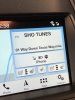
An update. I copied my music files from the iTunes folder onto a cheap USB drive I had.

While it's not 100% yet, as at least one artist is missing...and maybe a Podcast or two....but overall, I'm impressed. It seems much more responsive than the iPod Touch. My OCD would like it to display a name rather than "USB Device".

I'm going to look at the files on the thumb drive tomorrow.

While the iPod may be a bit easier to SYNC when new music is added...I figure I can just do a simply "copy all" and not replace existing files.
 

Matt M PA

SHO Member
Joined
Nov 5, 2017
Messages
348
Reaction score
245
Indeed it did! Pic taken immediately after putting thumb drive in..was still indexing..

I may have also found a reason why sone tracks don't appear. Macs often hide file extensions....next time I go out I'll see if that worked...
 

Attachments

  • IMG_3649.JPG
    IMG_3649.JPG
    1.9 MB · Views: 10

Matt M PA

SHO Member
Joined
Nov 5, 2017
Messages
348
Reaction score
245
Well, yet another update. Seems that many of my iPod and USB troubles where due to Gracenote being turned on. Turning it off corrected artist name errors, and more.

However, still on artists are not appearing. At least the iPod working correctly...

UPDATE...looks like I found the problem with an artist not appearing, yet being on the device. They were .aiff files, which SYNC doesn't read. Converted to AAC and work.

I found the problem by plugging in my old iPod, that works with the Gateway adapter in the Excursion..and with a similar adapter in my previous Lincoln. In the SHO..it sees the files, but doesn't play them. I suppose SYNC uses an iPod like it would a thumbdrive and not using the iPod to actually handle the playback.

The iPod Touch is back to not showing all tracks, etc...but the thumbdrive is working well.
 
Last edited:

Forum statistics

Threads
107,084
Messages
1,181,252
Members
16,148
Latest member
thatSHOguy101

Members online

Back
Top