

Storm-Chaser
New Member
The write-up is basically complete. The instructions are all here for the dis-assembly/re-assembly, I just need to finish photographing the various parts/steps I don't have images for. I'll add/update images as they become available.
Special thanks goes to Dave (Inkertinker) for taking many/most of the images below.

Special thanks goes to Dave (Inkertinker) for taking many/most of the images below.
- Start by removing the alternator pulley. It can be removed with a 24mm socket and impact wrench. If there is any rust evident on the shaft, pretreat with PB Blaster. You can try using a strap wrench, but I broke the rubber strap before resorting to the impact.
[image]
- Next, pull the voltage regulator and extended post for the alternator cable. Remove the (4) T-20 torx screws, tilt and lift the voltage regulator away from the alternator housing. If you're simply replacing the brushes or voltage regulator, go to step 16. Pop the plastic cover off the base of the extended post, remove the 11mm washer-nut.
[image]
- Remove the (3) 8mm housing bolts. If there is any corrosion evident, pretreat with PB Blaster.
[image]
- With the alternator stripped-down, remove the back-housing by using a large flat screwdriver (or other similar "tool"), prying between the back-housing and housing tabs for the rectifier. Work your way progressively around the three points, as your essentially pulling the small rear shaft bearing out of the back-housing cover.
[image]
Here's what the alternator will look like with the back-housing removed.
Note: the shaft bearing in this image was damaged, due to a contact collision with Dave's garage floor.
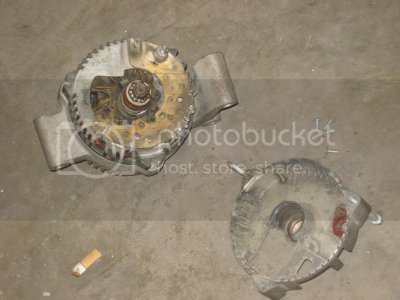
Footnote: cigarette butt courtesy of silver89SHO.
- Get out the soldering gun and de-solder the (6) wires leading from the stator to the rectifier bridge. Using small needle-nose pliers or similar "tool", work open the soft metal plate clamping both sides of each lead from the stator. In this image, the leads have been pryed from the rectifier bridge, in the true spirit of this being a donor alternator from an Exploder.
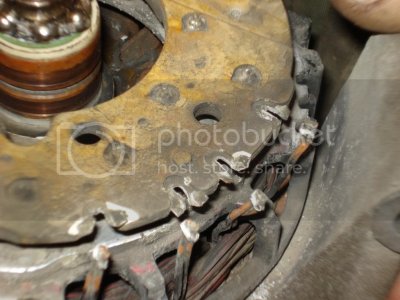
The rectifier bridge can now be easily lifted off the stator/rotor assembly.
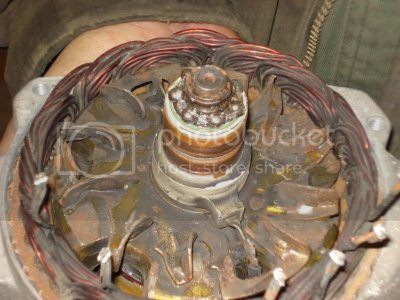
- Use a soft-faced mallet to remove the rotor, by tap on the alternator shaft until the rotor slides through the front-housing bearing.
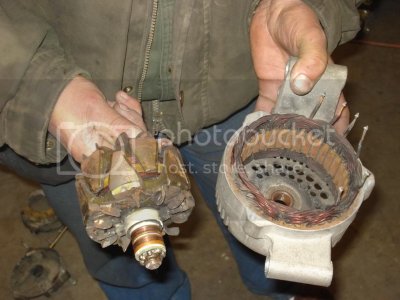
- Remove the (3) 8mm bolts and cover plate inside the front-housing, to expose the backside of the front shaft bearing.
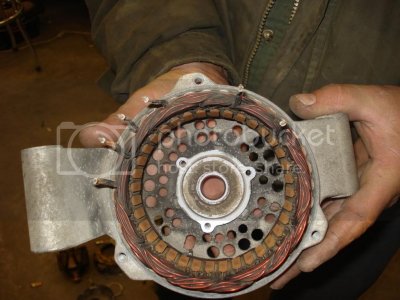
- If you're replacing the front/rear shaft bearings, use the soft mallet to tap the bearing out of the front-housing. Go to step 10 if you're only replacing the front/rear shaft bearings, to begin re-assembly.
[image]
- Now comes the "fun" part - removing the stator from the front-housing cover. If you're not replacing the stator or upgrading to a 200A stator, skip this and get out the parts to rebuild the alternator with.
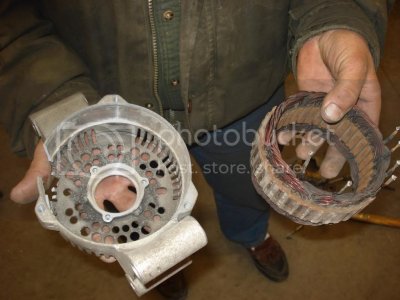
Footnote: to "expedite" the removal of the stator from the Exploder donor alternator, a special 4-lb tool was used which resulted in breaking the front-housing . . . . (oops!).
Here's is a readily available rebuild kit for the minor stuff (ie. no stator, rotor, rectifier bridge).
You are now ready to clean / paint / polish / powder-coat / change the housings, in preparation for assembly.
:woo-hoo:
Re-assembling the Alternator
- Ensure the front shaft bearing seat in the front-housing is clean of corrosion/debris. Slowly tap the front shaft bearing into the housing, gradually working your way around the bearing. You can use a XXmm socket as a "tool" to seat the bearing, once it has been started into the housing. Place the front bearing cover on, and torque the (3) 8mm bolts to xx in-lbs. If the stator was not removed, skip to step 13.
[image]
- Pre-assemble the the alternator housing and rectifier bridge to align the stator. First, insert the rectifier bridge into back-housing to properly position of the voltage regulator. Second, lower the stator into the rectifier bridge to align the (6) wire-leads from the stator. Next, set the front-housing on the stator, and note/mark the position of the two outer wire-leads.
[image]
- Separate the stator/front-housing. Align the stator, place it on the bench and start tapping the stator down into the housing until fully seated.
[image]
- Install the rotor back into the front-housing and tap into place using the soft mallet.
[image]
- Place the rectifier bridge on the rotor/stator assembly and recheck alignment. If correct, clamp the rectifier's tabs around each of the stator wire-leads. Solder each of the wire-leads in-place.
[image]
- Position the back-housing on the assembly and check alignment of the rear shaft bearing. If correct, tap the housing partially down onto the assembly with the soft mallet. Use the (3) 8mm housing bolts to finish drawing the back-housing case into place against the rectifier/front-housing portions of the alternator. Torque to xx in-lbs.
[image]
- If you're replacing the voltage regulator brushes, secure the brushes to the regulator with the two longer T-20 torx screws. Cover the right screw with the small plastic cap that was initially removed.
[image]
- Use a paper-clip to secure the brushes in a retracted position, as shown.
[image]
Insert the voltage regulator back into the alternator housing. Install the (4) T-20 torx screws and torque to xx in-lbs.
[image]
- Remove the paper clip to set the brushes against the alternator shaft. Reinstall the extended post, and torque the 11mm washer-nut to xx in-lbs.
[image]
- Replace the alternator pulley and secure with the impact wrench.
[image]
Congratulations - YOU'RE DONE ! ! ! !
:woohoo:
Take the alternator to your local parts store to have it tested. Nothing sucks worse than installing a bad alternator !

Last edited:


