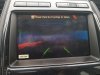
Backup Camera Issue

Disclaimer: Links on this page pointing to Amazon, eBay and other sites may include affiliate code. If you click them and make a purchase, we may earn a small commission.

jman1200

SHO Member
Joined
Dec 5, 2017
Messages
695
Reaction score
644
Location
Ontario
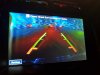
Yesterday my backup camera went blue, the Nav screen works fine so it is not that.
Already did the reset and a Sync reboot, nothing worked.
Argghhh !!! haven't had this car for that long and can't catch up... issues are coming up faster than I can fix them.
Guess I need to replace the camera.... one more thing to the list. First Ford and not liking its reliability so far...
20180513 214021 20180514 084058
 

krewat

SHO Member
Joined
Dec 20, 2012
Messages
1,191
Reaction score
1,025
Location
Long Island
Besides going to the Ford Parts Dept at your local dealer, look around on eBay or Amazon for the part first. It's amazing the differences in prices.
 

Lostneye

SHO Member
Joined
Feb 23, 2017
Messages
1,281
Reaction score
1,105
Location
NY
Most likely the camera itself. Not sure about 2010-12 but my 2013 had to be programmed by the dealer(twice but that's another story) for the back up warning boxes and white lines that move when you turn the wheel to show up.
 

jman1200

SHO Member
Joined
Dec 5, 2017
Messages
695
Reaction score
644
Location
Ontario
No white lines or warning boxes on mine... guess that is a 2013+ feature
 

jman1200

SHO Member
Joined
Dec 5, 2017
Messages
695
Reaction score
644
Location
Ontario
These are (were !) the only settings on mine, no white lines or boxes... or are there other settings?
 

Attachments

  • 10ngnsn2e - Navigation Manual.pdf
    43.8 KB · Views: 7

SilverSH0

SHO Member
Joined
Nov 17, 2015
Messages
896
Reaction score
827
Keep looking..... even your attachment shows the lines :) It's under camera settings.

Here you go:

https://owner.ford.com/how-tos/sync...tings/changing-rear-view-camera-settings.html
I went to your link to check it out and when I put in 2010 Taurus SYNC w/ voice activation it tells me it's not applicable to that model. My 2010 has the two red/yellow/green lines and that's it. There is no center line and there are no lines that move with the steering wheel (no options for that either).
 

Majestic

SHO Member
Joined
Aug 28, 2016
Messages
1,234
Reaction score
998
I went to your link to check it out and when I put in 2010 Taurus SYNC w/ voice activation it tells me it's not applicable to that model. My 2010 has the two red/yellow/green lines and that's it. There is no center line and there are no lines that move with the steering wheel (no options for that either).

I was responding to Jman1200 in reference to 2013 and newer. No idea about the older cars.
 

SilverSH0

SHO Member
Joined
Nov 17, 2015
Messages
896
Reaction score
827
I was responding to Jman1200 in reference to 2013 and newer. No idea about the older cars.
Right. He said "I guess it's a 2013+ feature." and you responded with "Nope. You most likely have them turned off."

I was simply posting that I have a 2010 and the lines are not an option. So if Jman has a 2010 (which he does according to his signature), he also won't have those lines and there are no options where he can turn them on. I don't know how you intended your response to read but how I read it (and still read it) was you implied it was applicable to all years (I suspect it's only applicable on 2013+ years).
 

jman1200

SHO Member
Joined
Dec 5, 2017
Messages
695
Reaction score
644
Location
Ontario
Update, camera is working again.
I removed the trunk's lid liner and all I had to do is wiggle the cables a bit and the image came back. Then I wiggled the connector in and out just to be sure.
Guess it lost connection after 8 years. I read of someone that got his camera working again by banging on it (old school), guess it was the same issue.
 

Majestic

SHO Member
Joined
Aug 28, 2016
Messages
1,234
Reaction score
998
Right. He said "I guess it's a 2013+ feature." and you responded with "Nope. You most likely have them turned off."

I was simply posting that I have a 2010 and the lines are not an option. So if Jman has a 2010 (which he does according to his signature), he also won't have those lines and there are no options where he can turn them on. I don't know how you intended your response to read but how I read it (and still read it) was you implied it was applicable to all years (I suspect it's only applicable on 2013+ years).

Yes, my bad. I totally misread that to mean that he had a 2013. Sorry about that.
 

mknittel

Member
Joined
Apr 21, 2015
Messages
67
Reaction score
29
Location
St. Charles, MO
Yes, my bad. I totally misread that to mean that he had a 2013. Sorry about that.
In my 2015 I have the camera settings shown in the link above, but it is only to enable/disable the Red, Yellow, and Green proximity boxes. The lines don't move with my steering wheel. What's strange is the 2015 Limited I test drove did this (lines moved with the steering wheel) but when I took delivery on mine, it didn't. Hadn't thought about it again before now. Is this something that can be sent to the camera via a configuration as-built string?
 

Lostneye

SHO Member
Joined
Feb 23, 2017
Messages
1,281
Reaction score
1,105
Location
NY
In my 2015 I have the camera settings shown in the link above, but it is only to enable/disable the Red, Yellow, and Green proximity boxes. The lines don't move with my steering wheel. What's strange is the 2015 Limited I test drove did this (lines moved with the steering wheel) but when I took delivery on mine, it didn't. Hadn't thought about it again before now. Is this something that can be sent to the camera via a configuration as-built string?
I just checked the settings on my 2013 and it is the same. The white lines that turn when you turn the wheel cannot be turned on or off only the proximity boxes. I would imagine you can program with Forscan if you know what sting and what to change it to. The dealer replaced my camera under warranty and when I called when I noticed the problem I was told it would need to be reprogrammed. Without the correct programming it only had the green, yellow, red lines and a center dotted line(this is no longer there once it was reprogrammed).
 
Back
Top