Suddenly I have a coolant gauge?

Disclaimer: Links on this page pointing to Amazon, eBay and other sites may include affiliate code. If you click them and make a purchase, we may earn a small commission.

RickyRecon

SHO Member
Joined
Apr 23, 2022
Messages
170
Reaction score
214
Location
Northwest Indiana
Go into trip on the left hand menu. Right arrow. A menu should pop up saying "enhanced" or "standard" click enhanced and you will get more information.
That one I do not seem to have. Right arrow is dimmed and does nothing. Just the miles, mpg, and elapsed time. What else is displayed on the enhanced setting?
 

RickyRecon

SHO Member
Joined
Apr 23, 2022
Messages
170
Reaction score
214
Location
Northwest Indiana
Here's another one with the fob in your pocket you don't have to hit the unlock button just put your hand in the door handle and it automatically unlock. The other one is if you punch in the key code to unlock the door and hit number five right after the trunk will open number four will unlock all the doors
Also, if it’s unlocked and you grab and hold the door handle, it will lock the doors
 

savagebury

New Member
Joined
May 22, 2022
Messages
2
Reaction score
1
Location
Michigan
Took me several days to find out that there's a button that makes a rear window sun screen pop up.
My Sun screen is stuck so it took me even longer to figure out what that button did. Still trying to figure out what the button next to it is
 
Last edited:

TTSHO

Member
Joined
May 10, 2021
Messages
68
Reaction score
48
Location
Missouri
It was about a year before I figured out you can use the arrow pad on the side of the seat to toggle through and adjust the seat settings on the screen. I didnt even realize the arrow pad was even there. I always used the touchscreen to do it. Felt like a real *******. Havent figured out how to go back to the homescreen afterwards without using the touchscreen though. If you even can.
 

SeanDev

SHO Member
Joined
Jun 6, 2021
Messages
632
Reaction score
487
Location
46131
My Sun screen is stuck so it took me even longer to figure out what that button did. Still trying to figure out what the button next to it is
That would be your TC, if you have the performance pack that button functions, if it didn't come with performance pack it just a fake button and will not move.
 

sanman

SHO Member
Joined
Aug 5, 2015
Messages
103
Reaction score
54
Is your car a PP? if you push the TC botton once it will turn off TC but still has advanced track on. If you push the TC button twice fast it will turn off all TC and AT and put the all TC basically off.
Didnt know this one thanks.......
 

Ta2dResqr

SHO Member
Joined
Dec 10, 2020
Messages
1,208
Reaction score
1,144
Location
Central Ohio
That would be your TC, if you have the performance pack that button functions, if it didn't come with performance pack it just a fake button and will not move.
Mine has 3 buttons. Active Park Assist, Lane Keeping, and the rear curtain.
 

SM105K

Streetlight Grand Prix Champ/ IG @fafomotorsports
Joined
May 3, 2018
Messages
7,405
Reaction score
9,701
Location
Arizona
That one I do not seem to have. Right arrow is dimmed and does nothing. Just the miles, mpg, and elapsed time. What else is displayed on the enhanced setting?

Here is the picture of mine "enhanced".
20181103 131332
 
Last edited:

tgabtg

Member
Joined
Apr 29, 2021
Messages
33
Reaction score
12
Location
Upland, CA
Actually, I forgot. When you grab the the handle, double tap and hold that rectangle on the right with your thumb to lock the doors

On my 2013, as long as the key is in my pocket, I just press the rectangle on the door handle and all the doors lock, no need to grab or hold ¯\_(ツ)_/¯
 

tgabtg

Member
Joined
Apr 29, 2021
Messages
33
Reaction score
12
Location
Upland, CA
Is your car a PP? if you push the TC botton once it will turn off TC but still has advanced track on. If you push the TC button twice fast it will turn off all TC and AT and put the all TC basically off.

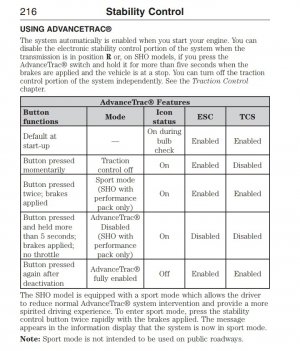
Here's something I found not sure if it was on this site.

"There's actually 3 Sport settings in case you were wondering.

If you tap the ESC button just once all it does is turn off Traction Control.

If you hit the button twice the dash with say "Sport Mode," and all this does is limit the amount Traction Control kicks in and limits the amount of Electronic Stability.

if you press and hold the ESC button for 5 seconds it shuts off everything - true Sport Mode!!"
 

SM105K

Streetlight Grand Prix Champ/ IG @fafomotorsports
Joined
May 3, 2018
Messages
7,405
Reaction score
9,701
Location
Arizona
Here's something I found not sure if it was on this site.

"There's actually 3 Sport settings in case you were wondering.

If you tap the ESC button just once all it does is turn off Traction Control.

If you hit the button twice the dash with say "Sport Mode," and all this does is limit the amount Traction Control kicks in and limits the amount of Electronic Stability.

if you press and hold the ESC button for 5 seconds it shuts off everything - true Sport Mode!!"
My PP only has traction off and Advance Trac off. I didn't get the "sport mode". Also some PP cars didn't come with a traction control button in the cubbie under the radio. I know of two PP cars that didn't. They went to Ford and bought the button assembly and installed it. They didn't have to program anything, just install the button because they were factory PP cars.
 

Jormungandr4898

New Member
Joined
Jun 2, 2021
Messages
8
Reaction score
9
Location
FL
Here's something I found not sure if it was on this site.

"There's actually 3 Sport settings in case you were wondering.

If you tap the ESC button just once all it does is turn off Traction Control.

If you hit the button twice the dash with say "Sport Mode," and all this does is limit the amount Traction Control kicks in and limits the amount of Electronic Stability.

if you press and hold the ESC button for 5 seconds it shuts off everything - true Sport Mode!!"
Got this from the owners manual
 

Attachments

  • Screenshot_20220617-172229_Drive.jpg
    Screenshot_20220617-172229_Drive.jpg
    166.6 KB · Views: 30
Last edited:

Joe_Cool

SHO Member
Joined
Apr 16, 2007
Messages
229
Reaction score
38
Location
Atlanta, GA
Go into trip on the left hand menu. Right arrow. A menu should pop up saying "enhanced" or "standard" click enhanced and you will get more information.
I guess this isn't available for 2016? I tried it on mine and nothing happened. :(
 

Joe_Cool

SHO Member
Joined
Apr 16, 2007
Messages
229
Reaction score
38
Location
Atlanta, GA
Mine has 3 buttons. Active Park Assist, Lane Keeping, and the rear curtain.
sucks that they removed all that stuff for the PP. Honestly I think I'd rather have the driver assist stuff more than the ability to turn off AT (even though that's pretty great).
 

Joe_Cool

SHO Member
Joined
Apr 16, 2007
Messages
229
Reaction score
38
Location
Atlanta, GA
On my 2013, as long as the key is in my pocket, I just press the rectangle on the door handle and all the doors lock, no need to grab or hold ¯\_(ツ)_/¯
That's how mine is (16 PP). Touch the inside of the handle and it does whatever one press of the unlock button does (all doors or driver door, depending on the setting selected). Touch the rectangle on the outside of the handle, it locks all doors.
 

Joe_Cool

SHO Member
Joined
Apr 16, 2007
Messages
229
Reaction score
38
Location
Atlanta, GA
My PP only has traction off and Advance Trac off. I didn't get the "sport mode". Also some PP cars didn't come with a traction control button in the cubbie under the radio. I know of two PP cars that didn't. They went to Ford and bought the button assembly and installed it. They didn't have to program anything, just install the button because they were factory PP cars.
I could never figure out the sport mode. Got it working just now, thanks to this thread.

One press: toggle normal advancetrac on/off
Double press when off: sport mode
Long press, stopped, in park, with brakes applied, no throttle: advancetrac off

I don't know the details of what third mode does, but it feels different.
 
Last edited:

Forum statistics

Threads
107,088
Messages
1,181,318
Members
16,154
Latest member
dan.delargy

Members online

Back
Top