


Ecoboost_xsport
SHO Member
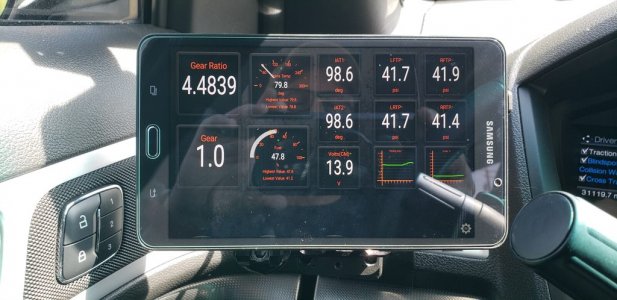
This is one, strangely, that I've had tons of people ask me about whenever I drop by car meets or shows. I wanted a good compact way to showcase some of the telemetry that is possible with an OBDII reader and the Torque Pro app. Figured I'd do a write-up on it in case anyone else was interested, but all-in, it got pricey pretty quick...so cost benefit analysis isn't really in my favor, LOL. But it looks great, right?

Although the SCT Livewire I have is capable of some gauge readouts, I liked the format and customization of Torque Pro. Just pay for the Pro version, BTW. Its way more potent. Anyway, I didn't want to use my phone as 1) it would be too small and 2) I didn't want to tie up my phone while driving. I wanted a dedicated screen for it.
I really like Torque for this purpose. You can read many of the PIDs the vehicle sends and also create your own "gauges" and telemetry based on calculating values from various sensors. For instance I use it to calculate Boost Air Density (BAD) from Manifold Air Density (MAD) and Ambient Air Density (AAD) (side note: still trying to nail down if the results I'm getting are accurate, work in progress for sure).
The app does have some limitations and I don't use it for legit datalogging I need to do for tuning purposes. For that I use the SCT device and a laptop.

That mount is created from a few separate pieces from various vendors. I got the actual vehicle mount from ProClip USA as well as a 15 degree wedge to give it that angle toward the driver's view.
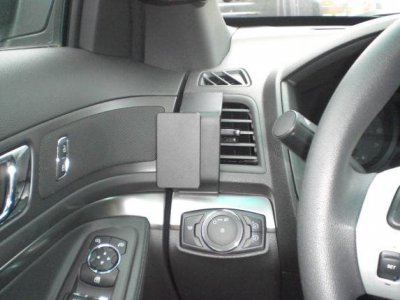
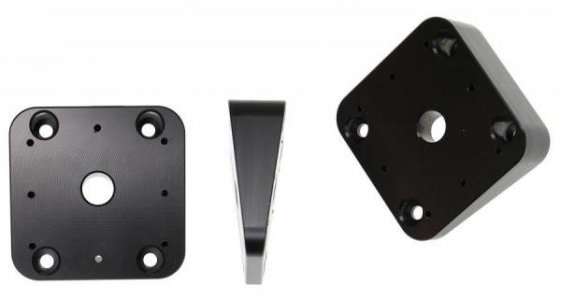
I use the RokForm system on every vehicle, motorcycle, work truck and bicycle I own, which makes it easy to interchange, mainly my phone, between the various modes of transportation I use. I wanted to keep the theme with this device. I like the RokForm system as it looks less obtrusive than gripping hands around an object. And it's VERY sturdy.
So I tried the RokForm perch mount and it worked perfectly. What's nice about this is, I can remove it to get the device out of the sun, or when parked at the mall or somewhere i don't want prying eyes to see it.

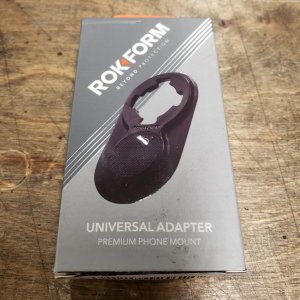
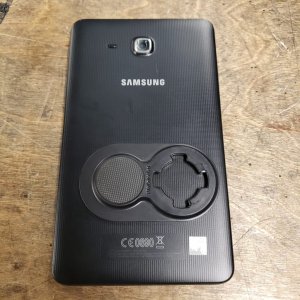
Also, whenever I have a device that doesn't have dedicated RokForm case, I use their universal adapter, and that was the case with the tablet I am using:
Here's everything installed:
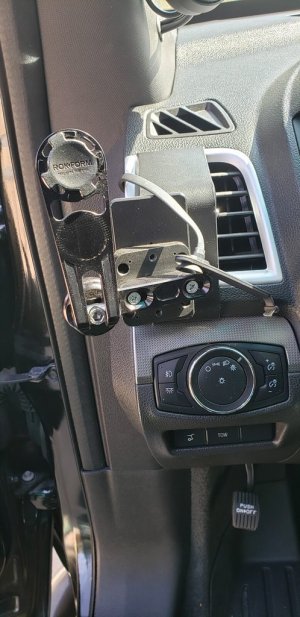
As you see in the pic, I broke one of the tabs off taking the tablet off too quick one day. I've since fixed it as the RokForm stuff is completely rebuild-able.
The screws I used for the perch are some countersink wood screws, as the hardware that came with it are machine screws. The 15 degree wedge is made from plastic that is meant to have wood/plastic screws form threads into it.
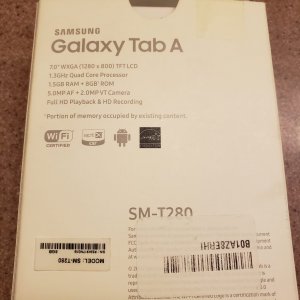
For the tablet, I went with a 7" Galaxy Tab A. It was the right size and cheapest priced tablet I could find:
Here's the back of the tablet combined with the universal Rokform mount:
And to ensure I was always getting power to this thing and not having cords laying across the dash, I hard wired a USB Kit I got from Amazon. I ran it behind the dash and tapped into the in-cabin fuse box that feeds 12VDC constantly using a multi-fuse tap adapter from Amazon. The fuses in that box are low-profile mini fuses but a low-profile tap adapter doesn't fit in that location, so had to use a normal mini tap adapter and use normal mini fuses in the tap adapter.
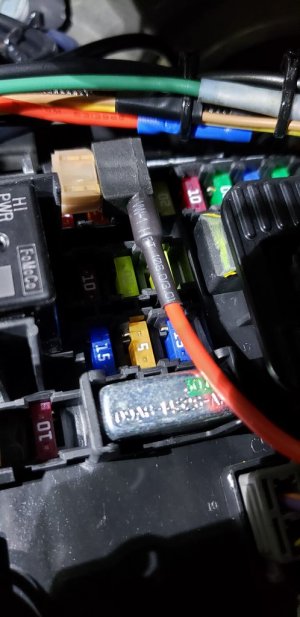
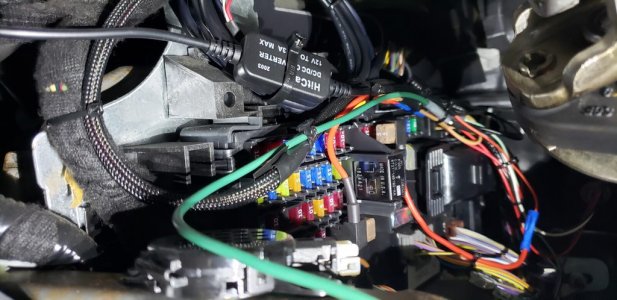
In this model, the F6 fuse slot is an unused 5A hot-at-all times slot, so it was a good place to get 12VDC so that it could receive power even when the vehicle is off.
A good side view of the setup:

And lastly, the OBDII sender:
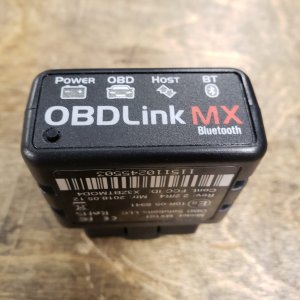
There's a lot of variants out there, but the OBDLink version is probably one of the better ones. Some of the cheap knock offs don't work right or only read either the low or high side CAN. I just went with the better one.
Just bluetooth to it, open up Torque Pro and you're off to the races! I love the gauge setups and all the various things that can be read.
So as I mentioned, by the time I was done, it got REALLY pricey. I don't think I've done this yet as it would scare me, but I'll do the math for you guys:
Yikes...total comes to ~$450 for a custom gauge setup. TBH, I've used the tablet for a lot more. I've used FORSCANLite on it, I've used it to record dB readings in the cabin, etc...so it's served some good uses and all-in-all I'm pretty happy with it.
Although the SCT Livewire I have is capable of some gauge readouts, I liked the format and customization of Torque Pro. Just pay for the Pro version, BTW. Its way more potent. Anyway, I didn't want to use my phone as 1) it would be too small and 2) I didn't want to tie up my phone while driving. I wanted a dedicated screen for it.
I really like Torque for this purpose. You can read many of the PIDs the vehicle sends and also create your own "gauges" and telemetry based on calculating values from various sensors. For instance I use it to calculate Boost Air Density (BAD) from Manifold Air Density (MAD) and Ambient Air Density (AAD) (side note: still trying to nail down if the results I'm getting are accurate, work in progress for sure).
The app does have some limitations and I don't use it for legit datalogging I need to do for tuning purposes. For that I use the SCT device and a laptop.
That mount is created from a few separate pieces from various vendors. I got the actual vehicle mount from ProClip USA as well as a 15 degree wedge to give it that angle toward the driver's view.
I use the RokForm system on every vehicle, motorcycle, work truck and bicycle I own, which makes it easy to interchange, mainly my phone, between the various modes of transportation I use. I wanted to keep the theme with this device. I like the RokForm system as it looks less obtrusive than gripping hands around an object. And it's VERY sturdy.
So I tried the RokForm perch mount and it worked perfectly. What's nice about this is, I can remove it to get the device out of the sun, or when parked at the mall or somewhere i don't want prying eyes to see it.
Also, whenever I have a device that doesn't have dedicated RokForm case, I use their universal adapter, and that was the case with the tablet I am using:
Here's everything installed:
As you see in the pic, I broke one of the tabs off taking the tablet off too quick one day. I've since fixed it as the RokForm stuff is completely rebuild-able.
The screws I used for the perch are some countersink wood screws, as the hardware that came with it are machine screws. The 15 degree wedge is made from plastic that is meant to have wood/plastic screws form threads into it.
For the tablet, I went with a 7" Galaxy Tab A. It was the right size and cheapest priced tablet I could find:
Here's the back of the tablet combined with the universal Rokform mount:
And to ensure I was always getting power to this thing and not having cords laying across the dash, I hard wired a USB Kit I got from Amazon. I ran it behind the dash and tapped into the in-cabin fuse box that feeds 12VDC constantly using a multi-fuse tap adapter from Amazon. The fuses in that box are low-profile mini fuses but a low-profile tap adapter doesn't fit in that location, so had to use a normal mini tap adapter and use normal mini fuses in the tap adapter.
In this model, the F6 fuse slot is an unused 5A hot-at-all times slot, so it was a good place to get 12VDC so that it could receive power even when the vehicle is off.
A good side view of the setup:
And lastly, the OBDII sender:
There's a lot of variants out there, but the OBDLink version is probably one of the better ones. Some of the cheap knock offs don't work right or only read either the low or high side CAN. I just went with the better one.
Just bluetooth to it, open up Torque Pro and you're off to the races! I love the gauge setups and all the various things that can be read.
So as I mentioned, by the time I was done, it got REALLY pricey. I don't think I've done this yet as it would scare me, but I'll do the math for you guys:
- ProClip Mount = $30
- ProClip Wedge = $12
- RokForm Perch Mount = $100
- RokForm Universal Adapter = $20
- Galaxy Tab A Tablet = $200
- USB Hardwire Kit = $13
- OBDLinkMX = $80
Yikes...total comes to ~$450 for a custom gauge setup. TBH, I've used the tablet for a lot more. I've used FORSCANLite on it, I've used it to record dB readings in the cabin, etc...so it's served some good uses and all-in-all I'm pretty happy with it.
Last edited:


